⏱ Limit Orders
Limit orders let you predefine trade conditions — buy or sell will be executed automatically once the price reaches the specified level.
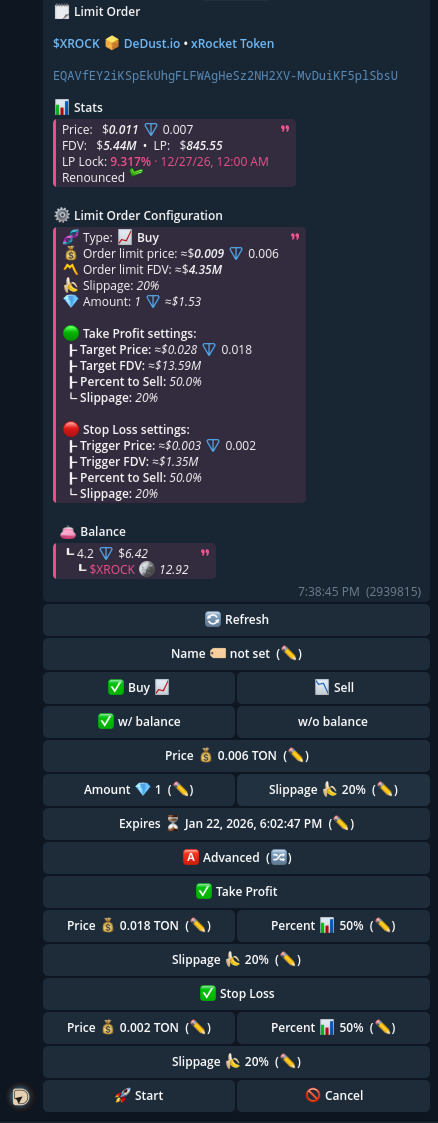
⚙️ Order Parameters
- 📈 Type (Buy / Sell) — trade direction
- 👛 Wallet — which wallet will be used for the order
- 💰 Price — the key condition to trigger the order
- 💎 Amount — how much TON or tokens to buy/sell
- 🍌 Slippage — allowed price slippage
- 🏷 Order Name (optional) — helps to keep track in the list
- ⏳ Expiration (optional) — time after which the order becomes inactive
- 🟢 Take Profit (optional) — automatically sells when price reaches your target profit level
- 🔴 Stop Loss (optional) — automatically sells when price drops to your stop loss level to limit losses
- 🚀 Start — launch the order
- ❌ Cancel — cancel before execution
🧭 How to Set Up a Limit Order
🔄 Choose order type
Tap 📈 Buy or 📉 Sell.
• 📈 Buy — executes when the price drops to your condition.
• 📉 Sell — executes when the price rises to your condition.
👛 Select wallet
Tap the wallet ✅ that will be used for the transaction.
💰 Set the Price
Tap Price ✏️ and choose format:
• 💎 In TON — exact price in TON.
• 📊 In % — relative change from the current price
– Buy: e.g. -50% → will buy when price drops by 50%.
– Sell: e.g. +50% → will sell when price rises by 50%.
• 💵 In $ — enter price in USD, bot will convert to TON.
• 🏦 By FDV — specify target FDV (e.g. 1B, 1M, 400K), price is calculated automatically.
💎 Set the Amount
Tap Amount ✏️:
• For buy: enter amount in TON or %.
• For sell: set % of tokens from your balance.
• You can also set in $ — bot converts into TON.
🏷 (Optional) Order Name
Enter a custom name to easily find it in the list.
⏳ (Optional) Expiration
Tap Expires ✏️ and choose time:
• Relative: 1d, 1m, 1y
• Absolute: 24.08 15:00 or 24.08.2025 15:00
🍌 (Optional) Slippage
You can set allowed slippage for execution.
🟢 Take Profit (TP)
Take Profit automatically sells part (or all) of your position when the price reaches a target level.
✅ Take Profit parameters
- 💰 Target Price — the price that triggers the take profit
- can be set:
- 💎 in TON
- 💵 in USD
- 🏦 by FDV (e.g.
13M,1B)
- can be set:
- 📊 Percent to Sell — how much of your token balance to sell (e.g.
50%) - 🍌 Slippage — allowed slippage for the TP execution
Example:
Target Price: $0.028 • Percent to Sell: 50%
→ when price reaches $0.028, the bot sells 50% automatically.
🔴 Stop Loss (SL)
Stop Loss automatically sells part (or all) of your position if the price falls to a specified level, helping limit losses.
✅ Stop Loss parameters
- 🚨 Trigger Price — the price that triggers the stop loss
- can be set:
- 💎 in TON
- 💵 in USD
- 🏦 by FDV
- can be set:
- 📊 Percent to Sell — how much of your token balance to sell (e.g.
50%) - 🍌 Slippage — allowed slippage for the SL execution
Example:
Trigger Price: $0.003 • Percent to Sell: 50%
→ if price drops to $0.003, the bot sells 50% automatically.
🔁 Using Take Profit + Stop Loss together
- Take Profit and Stop Loss can be enabled at the same time
- They work on the position created by the limit order execution
- Slippage is configured separately for TP and SL
🚀 Start or Cancel
• When ready → press 🚀 Start.
• If you change your mind → press ❌ Cancel.
📌 Notes
- Multiple limit orders can run in parallel
- Parameters can be edited before launch
- You can cancel the order anytime before execution