🎯 Snipes
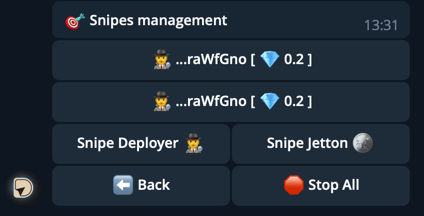
The “Snipes” menu allows you to set up automated token purchases as soon as they appear.
With snipes, you can track new tokens from specific deployers or target tokens and buy them instantly.
⚙️ Snipes Management
Available options:
-
👨💼 Deployer Snipe — track new tokens by deployer address.
- The bot monitors the chosen developer’s actions.
- When a new token is deployed — the bot auto-buys it.
- Useful for trusted deployers.
-
🪙 Token Snipe — automatic purchase of a specific token.
- Enter the token address manually.
- The bot waits for liquidity to appear.
- Suitable for targeted buys.
-
🔴 Stop All — stops all active snipes.
- Use in case of emergency to instantly stop every sniper.
- After this, the bot won’t track or buy tokens.
-
⬅️ Back — return to the previous menu.
🛠 Sniper Settings
To open settings:
Menu → Settings → Sniper Settings
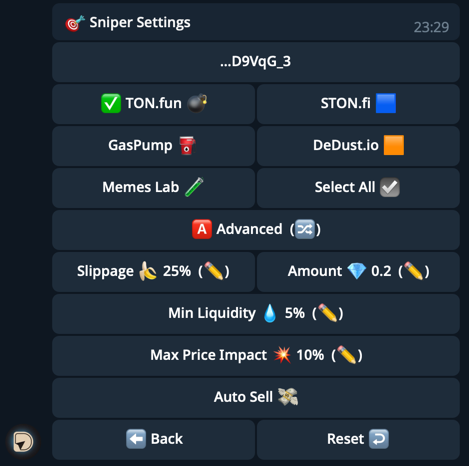
Available parameters:
-
👛 Wallets — add or select wallets from which automated buys will be made.
- You can use one or multiple wallets.
-
✅ Platforms for sniping — choose where to look for tokens:
- TON.fun 💣
- STON.fi 🟦
- GasPump 🛢️
- DeDust.io 🟧
- Memes Lab ✏️
- Select All — enable all platforms.
-
🅰️ Advanced Settings
- 🍌 Slippage — allowed slippage (e.g., 100%).
- 💎 Amount — amount of TON per buy.
- 💧 Min. Liquidity — minimum token liquidity in the pool.
- 💥 Max. Price Impact — maximum allowed price impact of your buy.
- 🔁 Auto-Sell — automatically sell tokens right after purchase.
How Auto-Sell works:
- After buying a token, the bot immediately sends a sell order.
- You can sell the entire balance or configure parameters.
- Useful for “buy & instantly sell” strategies, especially with hype tokens.
- 🔄 Reset — reset sniper settings to defaults.
- ⬅️ Back — return to the previous menu.