🚀 Trading
💬 First step to a trade
To open the trading interface and start working with a token:
- 📩 Send the bot the token contract address in the chat.
- 👛 Make sure you have at least one wallet selected. Multiple wallets can be used at the same time.
Example contract:
EQCAj5oiRRrXokYsg_B-e0KG9xMwh5upr5I8HQzErm0_BLUM
📊 After sending the address, the bot will load token data and open the trading menu, where you can buy or sell the token directly.
📊 Token Trading Menu
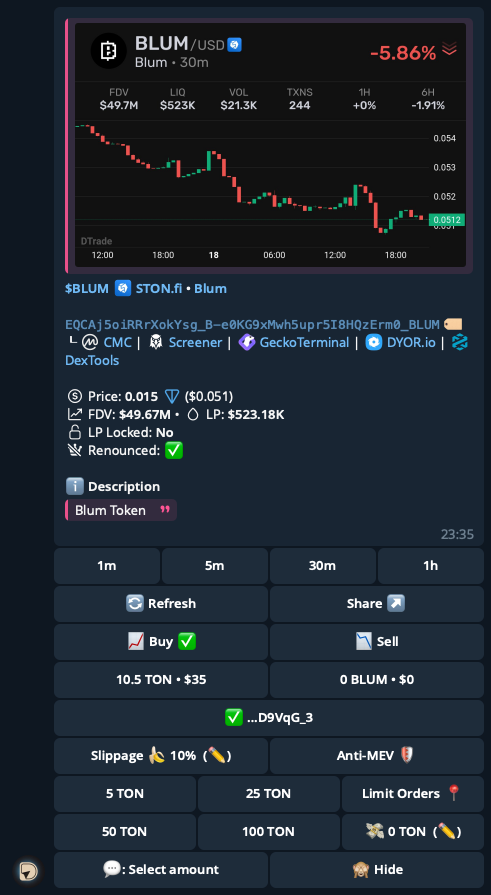
The trading window displays everything you need for fast and secure token operations.
🏷 Info Panel
- 📈 Price chart — token price changes over the selected period.
- 🏦 FDV — fully diluted valuation.
- 💧 LIQ — liquidity in the pool.
- 📊 VOL — 24h trading volume.
- 🔁 TXNS — number of transactions.
- ⏱ Price change — over 1 hour and 6 hours.
🪙 Token Details
- 📜 Token contract address
- 🔗 Quick links — CMC, Screener, and others.
- 💰 Token price — in TON and USD
- 🏦 FDV and liquidity — repeated for convenience
- 🔒 Liquidity lock status
- 🔑 Renounced ownership — contract ownership renounced
🔘 Token Actions
- 🔄 Refresh — update token data
- ✅ Buy — open the buy menu
- 💸 Sell — open the sell menu
- 🚀 STON.fi — proceed to trade via STON.fi
- 🌐 DeDust.io — proceed to trade via DeDust.io
💼 Balance
- ⚡ TON — your TON balance
- 🪙 Token — selected token amount
⚙️ Swap Settings
- 👛 Wallets — add or select active wallets
- 🔢 Quick buttons — select TON amounts for a trade: 20, 25, 35, 40 TON
- ✏️ Manual input — enter an exact token amount
- 📉 Slippage — allowed slippage (default 10%) ⚠️
- 🛡️ MEV-Protect — Protection against sandwich bots
🛡️ MEV-Protect side effect
- ⏳ Transactions take 5 to 90 seconds to process
- ⚠️ If processing exceeds 90 seconds, the transaction will fail
🧭 How to open settings
- ⚙️ Go to Settings
- Select Trading
🔧 Additional Options
- ✅ Auto-confirmation — automatic trade execution
- 📍 Limit order — open limit order settings
📎 Other Buttons
- ⬅️ Back — return to the main menu
- 🔁 Reset — reset all trading settings to default