📊 Positions
In the “Positions” menu you can view all the tokens you’ve ever bought — even those you might have forgotten about.
This helps track old assets, their current value, and potential profit.
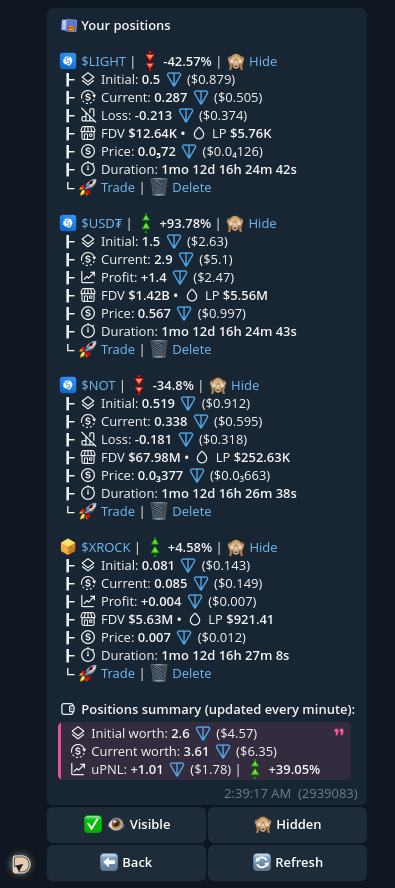
📑 What’s displayed
For each token, the menu shows:
- 🗃 Initial value — how much the tokens cost at purchase
- 💰 Current value — how much they are worth now
- 📊 Profit / Loss (PnL) — potential gain or loss if sold
- 🏦 FDV • LP — fully diluted valuation and pool liquidity
- 🪙 Token price — shown in TON and USD
- ⏳ Holding time — how long the token has been in your portfolio
👛 Below, a compact summary aggregates all positions:
- 🗃 Initial Worth
- 💰 Current Worth
- 📊 uPnL
✏️ What you can do with positions:
- You can 🙈 Hide position if you don't want to see it
- Or 👁 Reveal if you want to see it
- Or even 🗑 Delete position if you want to reset it permanently
🔃 Reset Initial
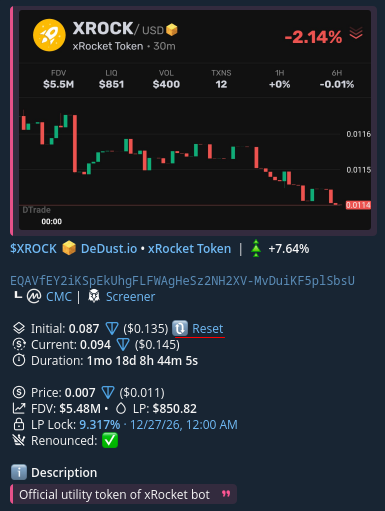
You can reset Initial for position using button in 📊 Token Trading Menu